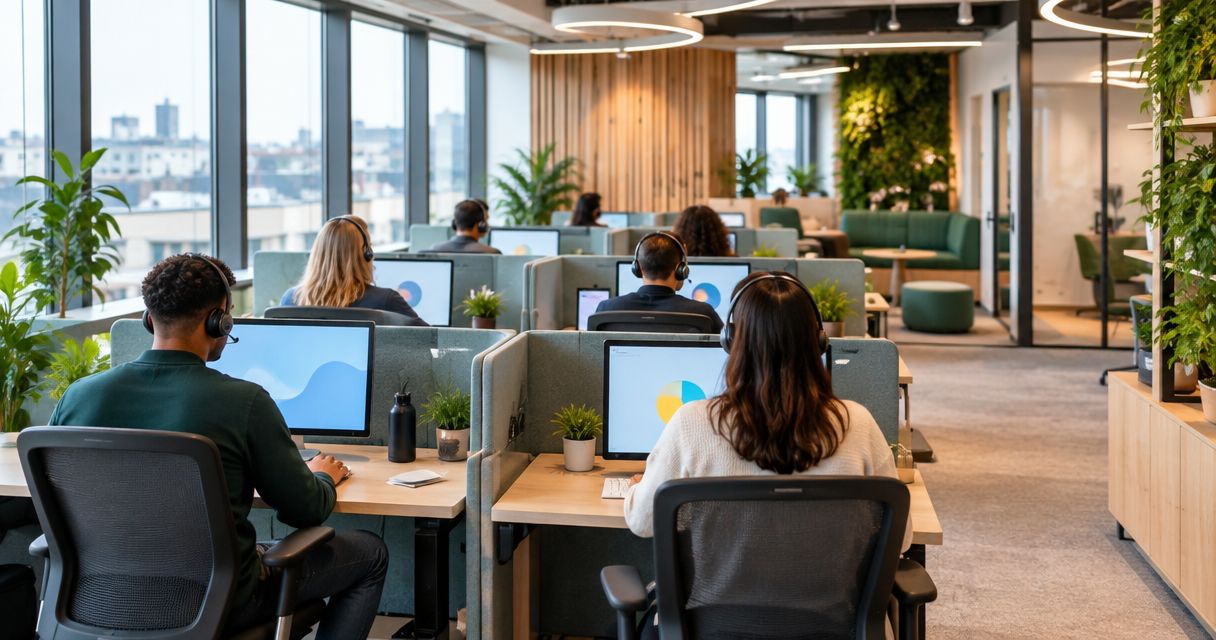
Best overall: acoustic zoning. Best for long seated shifts: adjustable ergonomic workstations. Best budget option: reconfigure existing desks around call activity. This Giant Leap guide ranks the best office interior design ideas for call centres in 2026 by the workplace problem each one solves.
TL;DR
- Giant Leap ranks acoustic zoning first among the best office interior design ideas for call centres 2026.
- Adjustable ergonomic workstations suit long seated shifts; glare-controlled lighting supports screen-based work.
- Separate live calls, coaching and breaks instead of expecting one open room to support every activity.
- Reconfigure existing desks first when the main problem is movement, adjacency or competing activities.
Why this matters
A call centre asks people to listen, speak, read and record information in the same workspace. Those activities create competing demands: agents need access to colleagues, but nearby conversations can interrupt listening and concentration.
Giant Leap's office interior design recommendation for call centres is acoustic zoning for voice-heavy teams. Start with the sound environment, then address workstation fit, lighting and movement. Decorative finishes come after those decisions, not before them.
For your 2026 brief, identify the problem at the level where it happens. Noise between desks needs a different response from noise escaping a training room. A chair adjustment will not resolve reflections on a monitor, and a partition will not fix an obstructed walkway.
What makes the best call-centre interior design
Judge each idea against these criteria before choosing finishes or furniture:
- Speech control: Does the layout separate competing conversations and address sound transmission as well as reflections?
- Workstation fit: Can agents adjust their seating and position their screens, keyboards and headsets comfortably?
- Visual comfort: Does lighting support screen work without direct glare or distracting reflections?
- Movement: Can agents and supervisors reach shared spaces without repeatedly passing through active call areas?
- Task separation: Are confidential conversations, coaching and breaks supported outside the main call floor?
- Adaptability: Can the arrangement change without blocking circulation or sacrificing workstation usability?
Use these as acceptance criteria for a 2026 redesign. A visually tidy office still fails the brief if agents cannot hear callers clearly or adjust their working position.
Call-centre design ideas at a glance
1
- Design idea: Acoustic zoning
- Best for: Voice-heavy call floors
- Standout feature: Separates activities and addresses sound paths
- Key limitation: Screens alone do not create confidential spaces
2
- Design idea: Adjustable ergonomic workstations
- Best for: Long seated shifts
- Standout feature: Fits the workstation to the agent
- Key limitation: Adjustments need explanation and consistent use
3
- Design idea: Glare-controlled lighting
- Best for: Screen-intensive work
- Standout feature: Coordinates lighting, windows and monitor positions
- Key limitation: Must account for changing daylight
4
- Design idea: Clear circulation routes
- Best for: Busy shift changes
- Standout feature: Keeps movement away from working agents
- Key limitation: Requires checking the complete floor plan
5
- Design idea: Enclosed quiet rooms
- Best for: Sensitive calls and focused tasks
- Standout feature: Provides separation from the call floor
- Key limitation: Privacy depends on construction and services
6
- Design idea: Dedicated coaching spaces
- Best for: Training and supervisor feedback
- Standout feature: Moves extended discussions off the floor
- Key limitation: Needs a clear booking and use policy
7
- Design idea: Separate break areas
- Best for: Teams sharing one call floor
- Standout feature: Separates rest and social conversation from calls
- Key limitation: A nearby open corner is not genuine separation
8
- Design idea: Reconfigured existing desks
- Best for: Teams correcting layout problems
- Standout feature: Changes activity relationships before furniture
- Key limitation: Cannot resolve unsuitable furniture or building faults
1. Acoustic zoning: best call-centre design for voice-heavy teams
Acoustic zoning groups compatible activities and separates competing ones. Distinguish live calls from coaching, informal conversation and equipment noise; then consider how sound travels between those areas.
Start your planning with 3 activity zones: live calls, coaching and breaks. These are planning categories, not a requirement for three enclosed rooms. The final arrangement depends on your building and working practices.
Acoustic zoning pros:
- Addresses the relationship between noisy and concentration-heavy activities.
- Gives acoustic treatment a defined purpose.
- Helps locate enclosed rooms where separation matters most.
Acoustic zoning cons:
- Absorptive finishes do not provide the same separation as suitable enclosure.
- Desk screens alone do not guarantee speech privacy.
Best for: Teams where simultaneous conversations dominate the working environment.
Verdict: Buy into acoustic zoning first; skip decorative screening presented as a complete sound solution.
2. Adjustable ergonomic workstations: best for long seated shifts
An ergonomic workstation combines seating, desk arrangement and equipment placement. Treat the chair, monitor, keyboard and headset as a working setup rather than separate purchases.
Check adjustment with the person using the desk. An adjustable chair does little for comfort if the screen remains badly positioned or the keyboard forces an awkward reach. Shared desks also need an easy reset between users.
Adjustable ergonomic workstations pros:
- Allow agents to change their working position.
- Support different users at shared desks.
- Make screen and input-device placement part of the design brief.
Adjustable ergonomic workstations cons:
- Adjustment features need clear instructions.
- Restricted desk space can prevent a workable equipment arrangement.
Best for: Agents who spend much of their shift seated and working with screens.
Verdict: Buy for adjustability and fit; skip selecting chairs on appearance alone.
3. Glare-controlled lighting: best for screen-intensive work
Glare-controlled lighting coordinates ceiling fixtures, daylight and screen orientation. The goal is a usable visual environment, not simply a brighter room.
Inspect occupied workstations with screens running. Look for reflections from windows and fixtures, then consider blinds, monitor positioning and lighting distribution together. Review your 2026 layout under different daylight conditions rather than judging it from an empty-office photograph.
Glare-controlled lighting pros:
- Addresses reflections where agents actually work.
- Connects daylight management with desk placement.
- Allows different tasks to receive appropriate lighting.
Glare-controlled lighting cons:
- Window conditions change through the day.
- Adding task lights without coordination can introduce new reflections.
Best for: Teams reading screens continuously, especially near windows.
Verdict: Buy a coordinated lighting plan; skip adding brightness without checking glare.
4. Clear circulation routes: best for busy shift changes
Clear circulation separates walking routes from occupied workstation space. Position shared destinations so agents do not need to squeeze behind seated colleagues or cross the floor repeatedly.
Trace routes between entrances, desks, storage, meeting rooms and break areas. Check them with chairs occupied and doors open, not only as lines on a drawing. Keep accessibility, emergency escape and applicable building requirements within the project brief.
Clear circulation pros:
- Gives movement a deliberate place in the layout.
- Reduces unnecessary passing through active call areas.
- Exposes conflicts between doors, storage and seating.
Clear circulation cons:
- Requires considering the whole floor, not individual desk clusters.
- An empty-room inspection can conceal occupied-space problems.
Best for: Teams with frequent movement, shared facilities or overlapping shifts.
Verdict: Buy into clear routes before increasing desk density; skip layouts that depend on empty chairs.
5. Enclosed quiet rooms: best for sensitive calls
Enclosed quiet rooms provide a place for conversations and tasks that should not sit within the general call-floor sound environment. Define whether each room supports confidential calls, focused work or private meetings before specifying it.
Check walls, doors, glazing, ventilation and service openings together. A room that looks enclosed can still transmit speech through gaps or connected building services. Furnish it for its intended task rather than treating it as spare space.
Enclosed quiet rooms pros:
- Separate sensitive conversations from nearby agents.
- Provide an alternative to the open call floor.
- Give focused tasks a defined destination.
Enclosed quiet rooms cons:
- Acoustic performance depends on the complete construction.
- Rooms need ventilation, usable equipment and a clear use policy.
Best for: Teams handling sensitive conversations or tasks requiring separation.
Verdict: Buy only against a defined privacy brief; skip assuming glass walls alone provide confidentiality.
6. Dedicated coaching spaces: best for training and feedback
Dedicated coaching spaces move extended teaching and feedback away from active calls. Equip the space around the work: reviewing screens, discussing scenarios and listening without disturbing adjacent agents.
Keep the location accessible to supervisors without making the coaching conversation part of the call floor. If a room serves several purposes, explain which activities take priority and how teams reserve it.
Dedicated coaching spaces pros:
- Separate training discussions from live customer conversations.
- Give feedback a consistent setting.
- Support shared review of screens and working material.
Dedicated coaching spaces cons:
- Competing bookings can displace coaching.
- Poor acoustic separation still allows discussions to spill onto the floor.
Best for: Teams with regular onboarding, call review or supervisor feedback.
Verdict: Buy into dedicated coaching space when training is routine; skip using circulation areas for extended feedback.
7. Separate break areas: best for keeping rest off the call floor
A separate break area gives social conversation and rest a place outside active call work. Locate it so access does not require walking through the quietest working area.
Separation matters more than decorative styling. A comfortable sofa beside occupied desks remains part of the call-floor sound environment. Check the relationship between the break area, food preparation, doors and nearby workstations.
Separate break areas pros:
- Keep informal conversation away from calls.
- Give breaks a distinct physical setting.
- Make food and drink facilities part of the circulation plan.
Separate break areas cons:
- An open corner offers limited acoustic separation.
- Poor placement can direct extra movement through working zones.
Best for: Teams whose breaks and calls currently compete in the same room.
Verdict: Buy into real separation; skip treating lounge furniture as a substitute for zoning.
8. Reconfigured existing desks: best for correcting adjacency problems
Reconfiguring existing desks changes which activities sit beside each other. It is the first layout option to examine when the furniture remains suitable but supervisors, shared equipment or walking routes are poorly positioned.
Draw 2 layout alternatives using the same furniture inventory. Compare call activity, sightlines, movement and access to services before choosing one. Reuse does not remove the need to check workstation fit or electrical arrangements.
Reconfigured existing desks pros:
- Tests a different arrangement without replacing every workstation.
- Makes activity relationships visible.
- Separates layout decisions from furniture selection.
Reconfigured existing desks cons:
- Cannot correct an unsuitable chair or inadequate desk surface.
- Fixed services and building features constrain placement.
Best for: Teams whose main problem is adjacency or movement rather than furniture condition.
Verdict: Buy into a measured rearrangement first; skip reshuffling desks without identifying the problem.
How the ideas are ranked
Giant Leap's call-centre office interior design ranking prioritises speech control, workstation fit and practical task separation. Acoustic zoning leads because it addresses competing conversations directly; the remaining ideas win distinct use cases rather than acting as universal substitutes.
This is a design-priority ranking, not a claim of measured performance. Choose the idea that matches your observed problem, then check it against the full set of criteria.
Turn the shortlist into a usable brief
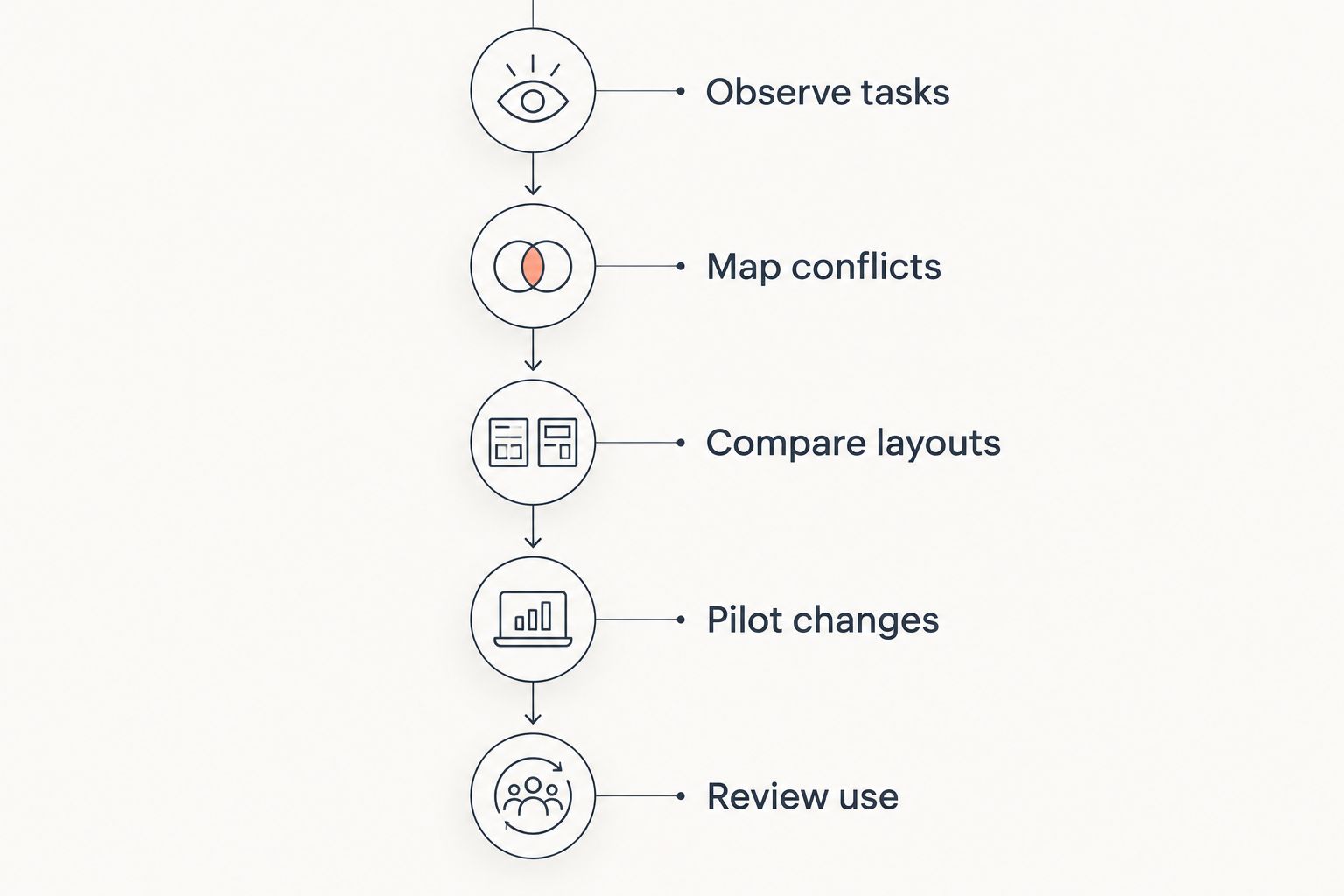
Use this sequence before committing to your 2026 layout:
- Observe tasks: Record where calls, coaching, focused work and breaks happen.
- Map conflicts: Mark competing conversations, glare and obstructed movement.
- Compare layouts: Check proposed arrangements against occupied workstations and shared destinations.
- Pilot changes: Trial reversible adjustments in 1 pilot row before repeating them across the floor.
- Review use: Ask agents and supervisors whether the original problem remains.
A pilot row is a practical starting scope, not a performance benchmark. Use it to discover equipment-placement and movement problems while changes remain easy to reverse.
Check a proposed layout against real tasks before repeating it across the floor.
Which call-centre design idea should you choose?
Choose acoustic zoning by default when competing conversations are the main problem. Choose adjustable ergonomic workstations when the issue is working position, and glare-controlled lighting when screen reflections dominate.
For your 2026 project, write the problem before naming the solution. Specify where it occurs, who experiences it and what a usable alternative must support. That gives every proposed layout a clear test beyond appearance.
FAQ
What's the best office interior design idea for a call centre in 2026?
Acoustic zoning is the first choice for a voice-heavy call centre. Separate live calls, coaching and breaks, then address sound paths and workstation conditions.
Is an open-plan call centre better than enclosed offices?
Neither arrangement is best for every call-centre task. Use the call floor for compatible activities and provide enclosed space where privacy or focused work requires separation.
Do acoustic desk screens make calls private?
Acoustic desk screens alone do not guarantee private calls. Speech privacy depends on the surrounding layout, sound paths and any enclosure used.
What furniture should a call centre prioritise?
Prioritise adjustable seating and a desk arrangement that supports usable screen and keyboard positions. Check the complete workstation with the agent rather than selecting furniture in isolation.
How do you reduce glare on call-centre screens?
Coordinate monitor orientation, window shading and lighting placement. Check occupied desks under different daylight conditions before adding more light.
Can you improve a call-centre layout without replacing all the desks?
Yes, reconfigure suitable existing desks when adjacency or movement is the main problem. Check access to services, occupied-chair space and workstation fit before moving them.
Should a call centre have a separate break area?
A separate break area is the better choice when social conversation competes with live calls. Locate it so its sound and access route do not disrupt working zones.
One last thing
Inspect the layout with people sitting in it. Chairs pull back, bags occupy space and open doors change routes. Walk from the entrance to a desk, from that desk to coaching, and from coaching to the break area; then listen from the agent's seated position.
That occupied-space check is more useful than approving a tidy floor plan that nobody has tried to use.