
Instead of manually changing office lighting schedules and checking separate control panels, connect the lighting controller to your building management system (BMS) through a supported interface. Keep room-level lighting decisions local, give the BMS defined supervisory commands, and test which command wins before extending the setup across the office.
TL;DR
- Office lighting design building management systems: integrate through a supported controller, not an assumed direct connection.
- Giant Leap’s office lighting guide is best for teams choosing lighting solutions before specifying BMS controls.
- Keep occupancy, daylight response and manual overrides local; define exactly what the BMS can change.
- Test conflicting commands, communication failures and recovery before approving the installation.
Why this matters
A lighting layout describes where light is needed. A controls design describes when it changes, who can override it and what happens when communications fail. Connecting the two requires more than displaying lighting status on a BMS screen.
For a 2026 office project, start with the tasks performed in each space, then translate those needs into zones and operating rules. Integration is complete only when the lighting behaves correctly, not merely when the BMS discovers the controller.
If you are still choosing fixtures and lighting approaches, start with Giant Leap’s guide to office lighting solutions for productivity. Settle the lighting requirements before deciding which commands belong on the building dashboard.
Before you start
- Collect the design materials: lighting layout, luminaire and driver schedules, control-system documentation, occupancy patterns, tenancy boundaries and the existing BMS points list. Identify the people authorised to approve lighting behaviour and network access.
- Confirm configuration access: arrange access to the lighting controller and BMS engineering environment, plus support from the responsible controls specialists. Record the supported protocols, gateway requirements and write permissions.
- Check the hidden compatibility issue: a DALI-compatible lighting installation does not automatically expose BACnet points to a BMS. Confirm the controller or gateway’s actual integration features, including writable commands, feedback and behaviour during communication loss.
Do not treat an emergency-lighting connection as an ordinary lighting-control point. Preserve the required emergency operation and obtain the responsible specialist’s approval before changing related controls.
Lighting zones and control ownership
Define the zones
- Mark each lighting zone on the office plan. Separate areas with different daylight exposure, occupancy patterns or operating hours instead of copying the electrical circuit layout without review.
- Assign each zone a readable name used consistently in the lighting configuration, BMS graphics and commissioning records. A meeting-room name should identify the same physical space everywhere.
- Write an operating sequence for each zone: normal occupancy, vacancy, daylight response, manual override, scheduled operation and communication failure.
- Assign responsibility for each decision. Let the local controller handle room responses where supported; give the BMS supervisory functions such as building schedules, central monitoring or approved building-wide commands.
Expected result: every controlled space has a named zone, an operating sequence and a clear owner for each command.
Avoid letting an occupancy sensor, wall switch and central schedule independently overwrite the same output without a priority rule. A technically valid command can still produce the wrong room behaviour.
For your 2026 controls schedule, document override release as carefully as override activation. State whether an override ends after a configured period, after vacancy, at a schedule transition or through an explicit release command. Choose the rule deliberately rather than accepting an unexplained default.
Choose the integration route
The lighting-side protocol and the BMS-facing protocol serve different purposes. DALI addresses lighting-control equipment; BACnet supports building automation communications. KNX is another building-control approach that can participate in a wider controls design.
DALI lighting controller with a BACnet interface
- Best for: Addressable lighting connected to a BACnet BMS
- Advantage: Separates lighting-level control from building supervision
- Limitation to resolve: Exposed points and writable functions depend on the controller or gateway
KNX lighting installation with a supported BMS interface
- Best for: Projects already designed around KNX
- Advantage: Keeps lighting within the existing building-control approach
- Limitation to resolve: Group-address mapping and gateway behaviour need explicit coordination
Supported native BMS lighting integration
- Best for: Projects with a documented lighting interface in the chosen BMS
- Advantage: Uses the integration functions provided for that installation
- Limitation to resolve: Supported devices, permissions and failure behaviour still require verification
Choose the route supported by the actual equipment, not by a protocol name on a proposal. Ask for the integration manual and point list before approving hardware. Confirm whether each required signal represents a command, a measured value, an estimated value or a fault indication.
Interface configuration and point mapping
Establish the connection
- Record the lighting controller or gateway model, firmware version and supported BMS interface. Match the integration documentation to the installed version.
- Have the network administrator approve addressing, segmentation and required communications. Do not expose a building controller directly to the public internet to simplify access.
- Configure the supported interface using the manufacturer’s documented procedure. For BACnet/IP, coordinate device identifiers, network settings and any required routing arrangements with the BMS specialist.
- Discover or import the approved points into the BMS. Verify each point against the controller’s documentation rather than accepting every discovered object as useful or writable.
Expected result: the BMS communicates with the intended controller and displays identifiable points without device-identity conflicts or unexplained communication errors.
Software interfaces differ between manufacturers. Use the installed product’s documented screen labels; BACnet property names such as Present_Value, Priority_Array and Relinquish_Default are protocol terms, not universal buttons.
Map commands and feedback
- Build a point register containing the zone name, source object, data type, units, read/write permission and intended function. Identify whether a point controls an individual fitting, a group or a scene.
- Map command and feedback separately. A requested dimming value does not prove that a driver accepted it or that the intended lighting condition exists at the desk.
- For BACnet commandable objects, inspect Priority_Array and document the permitted command priority. Confirm what Relinquish_Default means for that object when active commands are released.
- Define fault handling and update behaviour. Agree how the BMS distinguishes a valid unchanged value from a point that has stopped communicating.
Expected result: the BMS can issue approved commands, show the available feedback and identify communication faults without confusing those functions.
Do not label a percentage dimming command as measured illuminance. Illuminance is expressed in lux and requires an appropriate measurement source. Likewise, do not label an estimated consumption value as metered electricity use.
Your 2026 handover point register should preserve these distinctions. Clear naming prevents a dashboard from implying measurements the installation does not actually provide.
Operating rules and acceptance tests
Configure schedules and overrides
- Enter the approved occupied and unoccupied periods in the system designated to own the schedule. Avoid maintaining competing schedules in both systems unless their interaction is explicitly designed.
- Configure occupancy and daylight responses in the responsible controller. Check that a central command does not unintentionally disable the local behaviour the design requires.
- Set the agreed manual-override and release rules. Include an understandable way for facilities staff to identify an active override.
- Configure the documented communication-loss behaviour. Decide what remains under local control and how the installation resumes supervised operation after reconnection.
Expected result: normal use, local intervention and central supervision follow the same written operating sequence.
The core workflow is a sequence, not a collection of unrelated settings: define zones, establish the interface, map points, set priorities and verify behaviour.
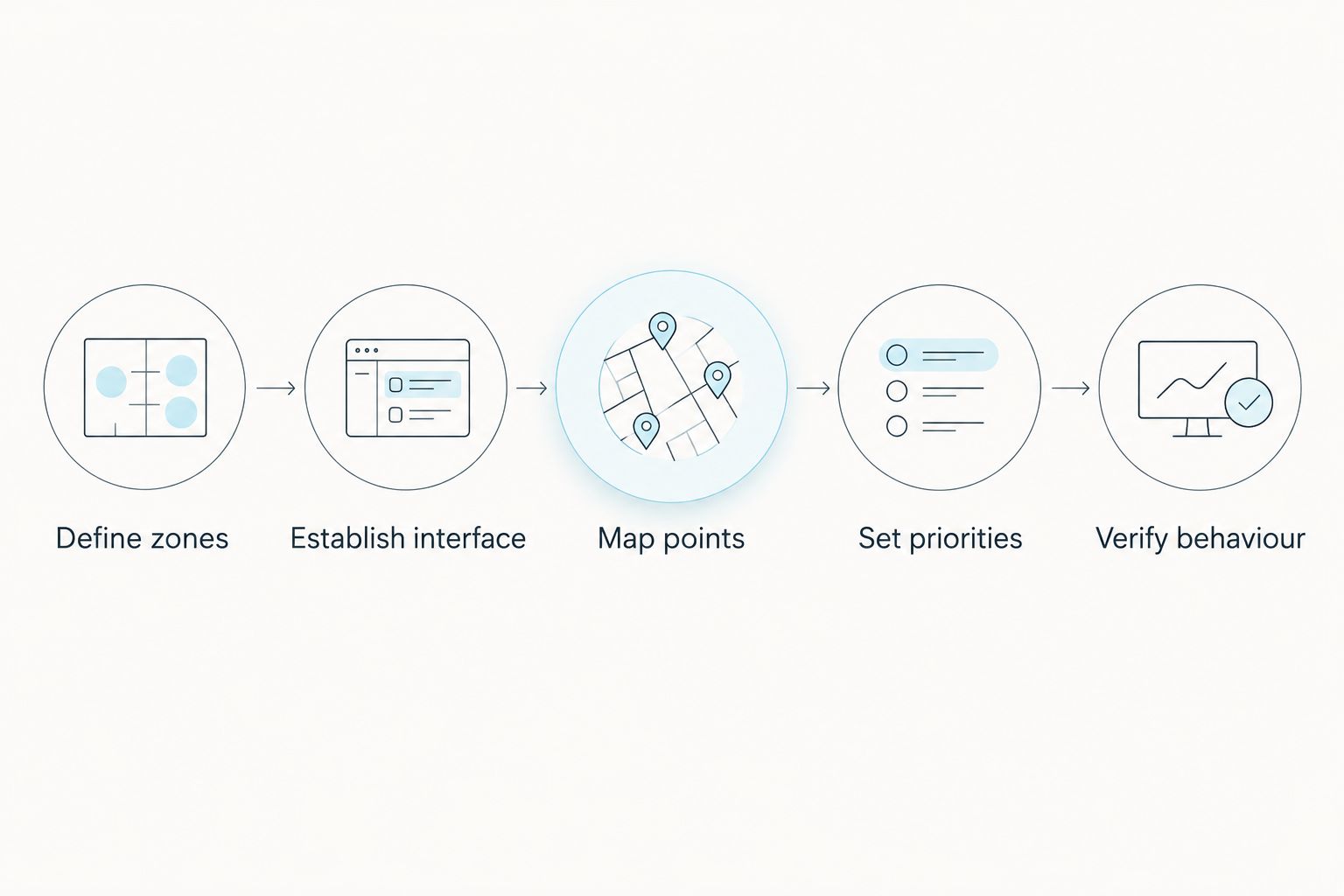
Set control ownership before testing commands from the building management system.
Test a pilot zone
Commission 1 pilot zone before copying the configuration elsewhere. Choose a space that exercises the relevant controls, not merely the easiest circuit to switch.
- Test 3 operating conditions: occupied operation, unoccupied operation and manual override. Record the expected response, observed response and pass or fail for each.
- Test simultaneous commands. Apply a central command while a local override is active, then release both in the documented order.
- Have the controls specialist simulate communication loss safely. Confirm local behaviour, the BMS fault indication and recovery after reconnection.
- Verify the physical lighting response in the room. Check the relevant task areas rather than approving the test solely from dashboard values.
Expected result: the pilot zone passes the written sequence, and any unresolved behaviour is corrected before wider deployment.
Keep 2 verification layers in the acceptance record: software evidence and physical observation. Neither alone proves that the office lighting design works as intended.
Variant: update lighting when office use changes
A schedule-led workflow suits predictable operating hours. An occupancy-led workflow suits spaces whose use changes during the day, provided the installed sensors and controllers support it.
Schedule-led supervision
- Best for: Areas with predictable operating periods
- Advantage: Gives facilities staff a clear central operating timetable
- Limitation: Needs a defined response when people remain outside scheduled hours
Occupancy-led local control
- Best for: Rooms with variable use
- Advantage: Responds to detected use rather than the timetable alone
- Limitation: Sensor coverage and vacancy behaviour require careful commissioning
For the occupancy-led variant, configure the local occupancy response first. Expose the supported occupancy status to the BMS for supervision, then define how the central schedule enables, limits or overrides that response.
When a room changes purpose, update its zone description, operating sequence and acceptance tests together. Moving desks without reviewing daylight groups or sensor coverage leaves the controls working to an outdated layout.
Troubleshooting
The BMS shows connected, but commands do nothing
Check whether the mapped point is writable and whether the command targets the intended group. For BACnet commandable objects, inspect Priority_Array for a higher-priority command that prevents the requested change.
Lights change back immediately after an override
Look for a competing schedule, occupancy routine or repeated command from another controller. Identify the owner of the output, then correct the sequence or release the conflicting command rather than repeatedly forcing the value.
A daylight zone dims the wrong desks
Compare the physical fittings, group assignments and sensor association against the zone plan. Correct the grouping before changing daylight-response settings; tuning the wrong group does not repair the mapping.
The dashboard looks normal during communication loss
Check how the BMS handles stale values and communication faults. Display an explicit fault state rather than leaving an old reading presented as current information.
Local control does not recover after central control ends
Verify that the central command is actually relinquished, not merely replaced with another value. Check the controller’s documented fallback and restart behaviour, then repeat the release and recovery tests.
Customize your workflow
Expand a proven pilot by zone type. Meeting rooms, open-plan work areas and circulation spaces need their own operating sequences; copying every setting from one room creates avoidable conflicts.
For a 2026 refurbishment, retain the approved point register, configuration backup, zone drawing and signed test results together. Record who can change schedules and who must approve changes to command priorities.
Giant Leap’s office lighting guide belongs at the design stage of this process. Use the chosen lighting requirements to brief the controls specialists, then require the integration to demonstrate those requirements in the occupied space.
FAQ
How do I connect office lighting to a building management system?
Connect the lighting controller through an interface supported by both the lighting installation and the BMS. Define zones, map commands and feedback, establish control priorities, and verify the physical response before extending the setup.
Can DALI lighting connect directly to any BMS?
No. DALI support does not automatically provide the interface a particular BMS needs. Confirm whether the installed controller requires a gateway and which commands and feedback it exposes.
Is BACnet better than DALI for office lighting?
BACnet and DALI serve different roles, so one is not a direct replacement for the other. A lighting controller can manage DALI equipment while exposing supported building-level functions through BACnet.
Should occupancy sensors connect to the lighting controller or the BMS?
Follow the documented control architecture and keep the occupancy response under a clearly assigned owner. Local lighting control can handle room responses while the BMS supervises supported occupancy information and building schedules.
What happens to office lighting if the BMS connection fails?
The result depends on the configured fallback behaviour and controller capabilities. Specify the required local operation, test communication loss safely and confirm recovery before accepting the installation.
Can a BMS dimming percentage prove that desk lighting is adequate?
No. A dimming percentage is a control value, not a measurement of illuminance at the desk. Verify task-area lighting with an appropriate measurement method and the project’s lighting criteria.
What should a 2026 lighting integration handover include?
Include the approved zone plan, operating sequences, point register, configuration backups and acceptance-test results. Identify the people authorised to change schedules, overrides and command priorities.
One last thing
A successful BMS command can leave the wrong lights on. The network can transmit correctly while the zone mapping remains wrong. Before signing off your 2026 installation, walk the office with the zone drawing and operate each group from its intended control point.
Treat Giant Leap’s office lighting guidance as the design input, not a substitute for that physical acceptance check. The final test happens at the workspace, not just on the screen.