
Instead of manually chasing layouts, approvals and snag lists, connect your office design brief to construction handover through a controlled sequence of decisions, documents and sign-offs. This Giant Leap guide sets out a 2026 workflow that keeps design intent, site instructions and completion evidence connected.
TL;DR
- Giant Leap’s office design brief to construction handover guide suits project leads who need clear approval gates.
- Approve the workplace brief before developing layouts, specifications and construction information.
- Give every design change an owner, impact assessment and recorded decision before implementation.
- Plan office fit-out handover around testing, operating documents and outstanding defects—not appearance alone.
Why this matters
A finished-looking office is not the same as a completed project. You need evidence that the agreed spaces work, installed systems have been checked, and the people operating the office know what they are receiving.
This Giant Leap office design guide is best for project leads who need clear approvals before construction starts. Use its approval gates to separate a request from an instruction and an inspection from acceptance.
For your 2026 project, keep one document register connecting the approved brief, current drawings, decisions and handover records. Every stage should end with a named approver and a clear release decision. Silence is not approval.
Before you start
- People and authority: Name the client decision-maker, project coordinator, design leads, contractor representative and facilities contact. Record who can approve scope changes and who can issue contractual instructions; these roles are not automatically interchangeable.
- Site information and access: Gather the lease constraints, landlord requirements, existing drawings, survey information, workplace needs and relevant building-services records. Arrange access for verification rather than treating old drawings as an accurate site record.
- The hidden dependency: Confirm how partitions, ceilings, ventilation, lighting, fire provisions and access requirements interact before approving the layout. A room that fits on a plan can still require changes to the services above it.
The field names below are suggested document labels, not software buttons. Use them in your existing project workspace, spreadsheet or document system; the workflow does not depend on a particular application.
Brief and approval register
The office design brief should describe how people need to work, not just how the office should look. Start with activities and constraints, then translate them into spatial requirements.
- Create the brief record. Add fields for Project purpose, Workplace activities, Occupancy assumptions, Required spaces, Site constraints, Budget authority, Target occupation and Approver. Distinguish confirmed requirements from assumptions that still need checking.
- Interview the people who use and operate the office. Include team representatives, facilities, IT and the person responsible for access and security. Ask where focused work, calls, meetings, visitors, storage and deliveries currently conflict.
- Translate requests into acceptance criteria. Replace vague instructions such as better collaboration with observable requirements: which teams need shared space, what equipment that space needs, and what privacy nearby work requires. Record priorities without promising an untested layout.
- Resolve contradictions in a 30-minute briefing review. Use this as a suggested meeting slot, not a project-duration estimate. Put competing requests in front of the decision-maker and record the chosen priority, including what the project will not provide.
- Approve the brief baseline. Give the agreed document a revision identifier and approval date. Record unresolved investigations separately, with an owner and a decision deadline tied to the next affected activity.
Expected result: You have an approved brief, an accountable decision-maker and a visible list of assumptions. A designer can explain which requirement each proposed space addresses.
Do not confuse a stakeholder wish list with the baseline. Preserve rejected requests and the reason for rejecting them so they do not quietly reappear during construction as supposedly forgotten scope.
Design and construction information
Develop the layout alongside the information needed to build it. A furniture plan alone does not resolve ceiling services, access control, power distribution or the junctions between materials.
- Verify the existing conditions. Check dimensions and visible service locations against the available records. Identify concealed conditions that require investigation and state where the design still relies on an assumption.
- Develop the space plan against the brief. Review circulation, room use, furniture arrangements, storage and operational needs. Mark each brief requirement as addressed, unresolved or intentionally excluded, with the decision recorded.
- Coordinate the disciplines. Bring the relevant architectural, structural and building-services contributors together. Resolve conflicts between partitions, ceilings, doors, equipment and maintenance access before releasing the affected work.
- Run a 60-minute coordination review. Treat this as a suggested agenda slot for unresolved interfaces, not proof that coordination is complete. Capture each issue under Location, Conflict, Decision owner, Required action and Release dependency.
- Release a controlled construction package. Include the drawings, schedules, specifications and details needed for the agreed scope. Record the issue purpose, revision and recipients; remove superseded documents from the active construction set while retaining the archive.
Expected result: The team can identify the current construction information and explain which work it authorises. Unresolved items have explicit restrictions rather than an implied permission to proceed.
For a 2026 office fit-out, review office lighting solutions for productivity alongside room layouts, furniture positions and controls. Lighting decisions belong in coordination, not in a separate aesthetic review after the ceiling arrangement is fixed.
The release gate is specific: design approval confirms the chosen solution, while construction release identifies information ready for execution. Keep those statuses distinct in the register.
Site instructions and change control
Construction introduces questions that the drawings cannot answer in isolation. Keep the route from a site query to an authorised response visible, especially when the answer affects another trade.
- Record each request for information. Use Query reference, Location, Drawing revision, Question, Response owner and Required response. Attach a marked-up drawing or photograph where it clarifies the problem.
- Classify the response. Separate clarification of the approved design from a proposed change. A clarification explains existing intent; a change alters scope, specification, arrangement or another agreed requirement.
- Assess the impact before approval. Record effects on programme, budget, services, procurement, access and completed work. Identify the person with authority to accept those effects under the project’s contract arrangements.
- Issue the authorised instruction. Link the decision to revised drawings or other controlled information where needed. Notify affected parties and confirm that the site team has replaced superseded information.
- Hold a 15-minute site coordination check when active interfaces need it. Use this suggested meeting length to surface blockers and allocate actions. Resolve technical details separately rather than turning a short coordination meeting into an undocumented design session.
Expected result: Every implemented change has a traceable reason, decision and information update. The site team does not have to choose between an old drawing and an informal message.
In the Giant Leap office design workflow, the practical rule is simple: a conversation can raise a change, but only the authorised process can release it. Urgency does not remove the need to record what changed and who accepted the consequences.
Completion and handover records
Prepare the handover register while construction is active. Waiting until the final inspection turns missing records into an occupation problem rather than a manageable project action.
- Define the evidence required. List applicable inspection records, test results, commissioning information, operating instructions, maintenance requirements, training and record drawings. Have the responsible professionals identify the certificates and approvals relevant to the actual scope.
- Inspect against the agreed requirements. Record defects by location and reference, with a clear description, responsible party and closure evidence. Separate incomplete work from a new client request so the defect list does not become uncontrolled additional scope.
- Verify operation, not appearance alone. Arrange the necessary checks of installed systems and controls. Match each test or demonstration to a recorded requirement and identify who is responsible for confirming the result.
- Walk through with the operating team. Demonstrate relevant controls, isolation points, access arrangements and maintenance tasks. Record attendance, outstanding questions and where the operating documents are stored.
- Record the acceptance decision. State what is accepted, what remains outstanding, who owns each action and how closure will be confirmed. Apply the project’s contractual completion process rather than treating a key exchange as sufficient evidence.
Expected result: The receiving team knows what has been delivered, how to operate it and which obligations remain open. Acceptance refers to evidence, not memory.
For a 2026 handover register, use separate fields for Physical completion, Testing evidence, Operating documents and Outstanding actions. One completed field must not automatically mark the others complete.
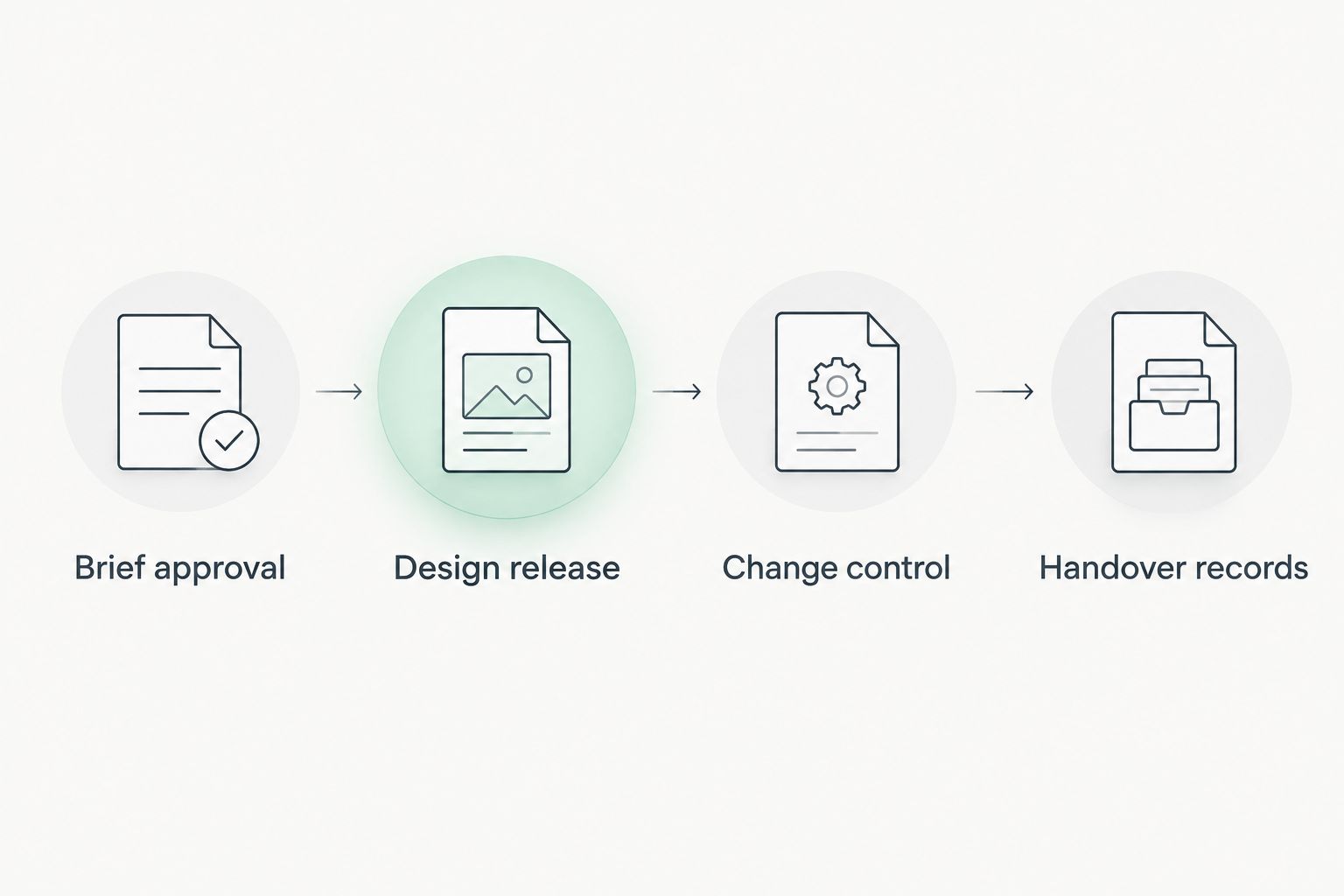
Each stage releases the next only when its decisions and evidence are recorded.
Variant: renovate while the office stays occupied
An occupied-office renovation needs the same approval gates, applied to each work area. Add temporary arrangements to the brief rather than leaving the contractor and occupants to negotiate them during the work.
Vacant-space fit-out
- Best for: A project with a separate construction area
- Main advantage: Work-area access can be planned without daily desk occupation
- Main limitation: Access, landlord restrictions and neighbouring occupiers still need coordination
Occupied phased renovation
- Best for: An organisation retaining office operations during works
- Main advantage: Teams can retain access to areas outside the active work zone
- Main limitation: Temporary routes, service interruptions and repeated moves require additional planning
- Define each phase boundary. Mark the work zone, occupied zone, access routes and temporary facilities. Confirm how deliveries, waste removal and contractor access interact with staff and visitors.
- Approve temporary conditions. Agree any planned service interruptions, relocation arrangements and communication responsibilities before the affected work starts. Have competent parties review safety and access implications.
- Coordinate interfaces before closing them. Treat drywall and ventilation coordination as a shared design-and-site task: check partition positions, service routes and access requirements before closing walls or ceilings. Record the agreed detail so each trade works from the same instruction.
- Hand over the completed area before moving the boundary. Inspect, test and document that area’s readiness. Confirm that temporary arrangements for the next phase do not undermine spaces already returned to use.
Expected result: Each phase has an approved start condition and a documented return-to-use decision. The programme does not assume that an apparently finished room is ready for occupation.
Troubleshooting
The layout is approved, but services do not fit
Stop release of the affected work and resolve the interface. Check the partition layout against ceiling services, equipment clearances and maintenance access. Update the coordinated information, record the decision and notify every affected trade before construction resumes there.
Site teams are using different drawing revisions
Reissue the current document register and remove superseded active copies. Confirm receipt with the people directing the work, including subcontractors. Keep historic revisions in the archive, clearly separated from the construction set, so the decision trail survives without creating ambiguity.
Stakeholders keep adding rooms or furniture
Return each request to the approved brief and change register. Ask whether it corrects a missed requirement or adds scope. Record the operational benefit and programme implications, then obtain the authorised decision before changing the layout or placing an instruction.
Snags are marked complete but remain disputed
Agree the closure evidence before closing the item. Reference the requirement, inspect the correction and record who verified it. A photograph can support the record, but it does not replace a functional test where operation is the issue.
Occupation is approaching and documents are missing
Assign every missing record to its responsible provider. Separate essential operating or acceptance evidence from other outstanding records, with the responsible professionals identifying any restriction on use. Record a dated recovery action rather than hiding missing documents behind a general completion status.
Customise your workflow
Start with the approval gates in this Giant Leap guide, then adjust the records to the project’s complexity. A smaller fit-out still needs clear authority, current information and documented acceptance; it does not need an oversized reporting system.
For your 2026 project template, add fields only when someone uses them to make or verify a decision. Connect each unresolved item to the activity it blocks, and give the facilities team access to the handover register before construction finishes.
Keep one owner accountable for each action. Several contributors can help, but a shared action without a named owner makes follow-up ambiguous. Review open decisions before discussing general progress.
FAQ
What should an office design brief include?
An office design brief should define workplace activities, occupancy assumptions, required spaces, constraints, approval authority and acceptance criteria. Separate confirmed requirements from assumptions that still need investigation.
What is the first step from an office design brief to construction handover?
Approve a clear brief and identify the person authorised to make project decisions. Then verify site conditions before developing and releasing coordinated construction information.
Can construction start before every design detail is finished?
Release only work supported by adequate, coordinated information and the required authorisations. Identify unresolved dependencies explicitly so an early release does not become permission to build affected details by assumption.
Who should approve changes during an office fit-out?
The person with delegated authority under the project arrangements should approve changes. Technical review, client acceptance and contractual instruction can involve different people, so record each responsibility.
What belongs in an office construction handover pack?
The handover pack should contain the records needed to verify completion and operate the delivered space. Depending on scope, these include record drawings, inspection and testing evidence, operating instructions, maintenance information and outstanding actions.
How do you manage a renovation while staff remain in the office?
Divide the renovation into controlled phases with agreed boundaries, temporary arrangements and return-to-use checks. Coordinate access, planned service interruptions and communications before each phase starts.
Is a snag list the same as construction handover?
No, a snag list records defects or incomplete work; handover also addresses operation, documentation, acceptance and remaining responsibilities. Close individual defects with evidence rather than using a general completion statement.
One last thing
Reconcile the final room names across drawings, controls, test records and maintenance documents. A room renamed during design can remain under its old name in other records, making faults harder to locate. Resolve naming mismatches before the receiving team inherits them.